Every sketch you make,
on one shelf.

Sketchshelf is a Mac app for hand-drawn diagrams and whiteboards, built on the open-source Excalidraw editor. It keeps all your drawings in a library, lets you mark up text the way you would by hand, and lets Claude draw with you.

Download for Mac Free. macOS 12 or later, Apple Silicon and Intel.
The Mac App Store version is in review.
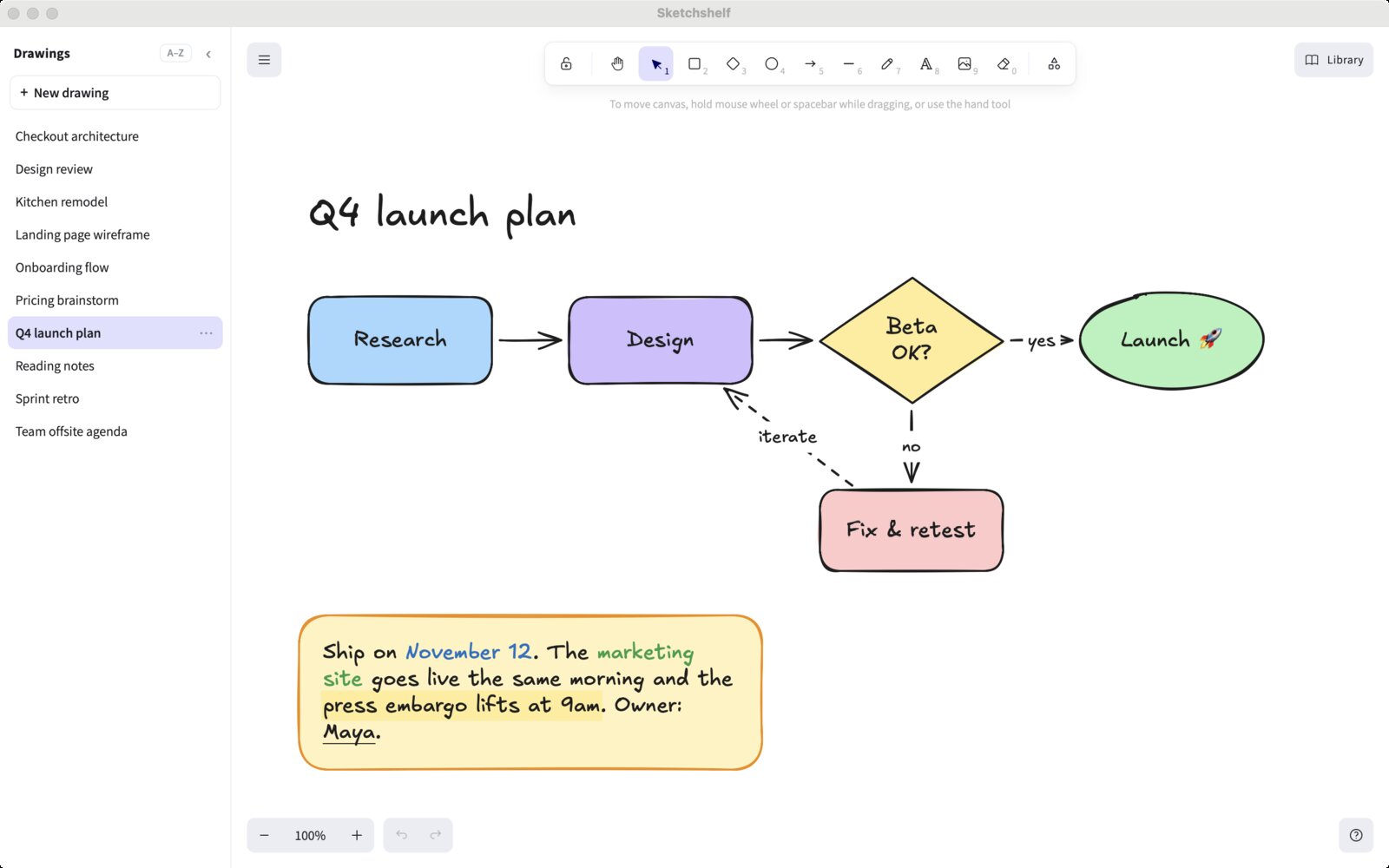
Sketchshelf: a sidebar listing ten drawings, and a launch-plan flowchart with a note whose words are coloured, highlighted and underlined
The sidebar holds every drawing. The yellow note is a single text block with four styles in it.

A library, not a browser tab

Every drawing sits in the sidebar. Click one to switch; the drawing you leave is saved first. Sort by name or by what you edited last, double-click a name to rename it, and collapse the sidebar when you want the whole window.

Each drawing is a standard .excalidraw file in a folder on your Mac. Nothing is uploaded, and there is no account.

~/Library/Application Support/Excalidraw/ Checkout architecture.excalidraw Kitchen remodel.excalidraw Q4 launch plan.excalidraw Reading notes.excalidraw Sprint retro.excalidraw .history/

Mark up a note like you would by hand

In Excalidraw a text box has one colour. In Sketchshelf, one note can mix styles: colour a date, highlight the line that matters, underline a name, put a box around a word.

⌘-double-click any text to open the editor, select a word and press a shortcut. Typing **word**, ==word== or __word__ styles it as you go.

Drag a note's left or right edge to re-wrap it at the same size. Corners still scale it, as usual.

Ship on November 12. The marketing site goes live the same morning, and the embargo lifts at 9am. Owner: Maya.

One text block, five styles.

⌘ BBlue
⌘ 1 2 3Red, green, orange
⌘ HHighlight
⌘ UUnderline
⌘ EBox
⌘ \Clear the styling

Saved as you draw

There is no save button. Your drawing is written to disk a moment after you stop, and again whenever you switch drawings or leave the window.

Each save replaces the file in one step, so a crash can't leave half a drawing. The last 20 versions of every drawing are kept in a hidden .history folder, in case you need one back.

.history/Q4 launch plan/ 1791406957787.bak 10:02 1791406999290.bak 10:03 1791407043980.bak 10:04 … up to 20

Claude can draw with you

Sketchshelf comes with an MCP server for Claude Code. Ask for a diagram and it appears in your library, laid out and ready to edit by hand. Change it yourself and Claude sees your changes the next time it looks.

If the drawing is open, it updates in place. ⌘ Z undoes anything Claude did.

Set it up

> draw the checkout flow: cart, address,
  payment, confirm

● draw "Checkout flow"
  4 boxes, 3 arrows

✓ opened in Sketchshelf

Bring your drawings with you

Double-click any .excalidraw file in Finder, or press ⌘ O to pick several at once. Each is copied into your library, and the original stays where it was.

Export a PNG or SVG, or save a copy of the file anywhere, from the menu on the canvas.

Everything else is Excalidraw

The tools, shortcuts, shapes, libraries and file format are the Excalidraw you know. Sketchshelf adds to the editor; it doesn't change it.

Compared with Excalidraw on the web

excalidraw.comSketchshelf
Drawings open at onceOne scene. Others are files you save and reopen.A library of them, one click apart
Where they're keptYour browser's storage, or Excalidraw's servers for share linksFiles on your Mac, never uploaded
Styling textOne colour per text boxColour, highlight, underline and box inside one note
SavingKept in the browser; export to keep a fileEvery change saved to disk, 20 versions kept
AI drawing on your canvasText-to-diagram inside the web appClaude Code edits your real drawings
Live collaborationYesNo, it's a single-person app

Private by design

No account, no analytics, no crash reporting. The app is built so it cannot connect to the internet at all, even for Excalidraw's own online features. Privacy policy

Download for Mac Free, signed and notarized by Apple.